
Download WebcamViewer – webcam viewer, webcam access, live webcam feed, camera feed, video feed
Overview
WebcamViewer is a streamlined utility application designed to simplify the process of accessing and viewing live webcam feeds directly from a user’s device. Built with minimalism and usability in mind, the app enables users to view their connected webcam with just a few clicks, eliminating the need for complex configurations or third-party software. Its primary purpose is to serve as a no-frills tool for individuals who require immediate access to their camera feed for quick checks, testing, or basic video monitoring.
The app targets users seeking a lightweight and efficient solution for webcam access, including remote workers, content creators, and individuals setting up video communication tools. While the developer, WebCamViewer Inc., is listed, no further background on the company or its history is available. The application is positioned within the Productivity category, suggesting it is intended to support workflow efficiency rather than entertainment or advanced video editing.
Real-world use cases include verifying camera functionality before a video call, testing hardware compatibility, or monitoring a space via a webcam in a home or office setup. In the broader app ecosystem, WebcamViewer fills a niche for users who want a dedicated, distraction-free tool without the overhead of full-featured video software. Its simplicity makes it a practical choice for users who value speed and reliability over advanced features.
Key Features & Functionality
- Click-and-Run Application – WebcamViewer operates as a standalone executable with no installation required. Users can launch the app immediately after download, making it ideal for temporary or on-demand use.
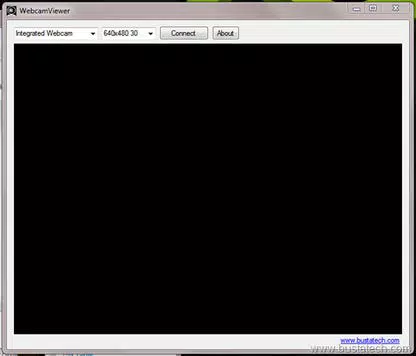
- Intuitive Interface – The layout is clean and minimal, with the primary control—webcam selection—located in the top-left corner. This design ensures users can begin viewing their feed without navigating through complex menus.
- Automatic Webcam Detection – Upon launch, the application scans the system for connected cameras and displays a list of available devices, reducing the need for manual configuration.
- Smart Webcam Identification – The app includes a built-in filter to help users avoid selecting virtual or non-functional devices like the Google Camera Adapter, which may appear in device lists but do not provide actual video input.
- Lightweight Design – At just 1.5 MB, WebcamViewer consumes minimal system resources, ensuring it runs smoothly even on older or low-spec machines without impacting overall performance.
For example, a user preparing for a virtual meeting can quickly open WebcamViewer to confirm their camera is working before joining a call. Similarly, a technician testing multiple webcams in a lab environment can use the app to verify each device’s output without launching heavier software. The combination of automatic detection and intelligent filtering enhances user confidence and reduces setup time.
Interface, UX & Performance
WebcamViewer features a minimalist interface that prioritizes clarity and function over visual flair. The main window displays the live video feed in the center, with a simple dropdown menu in the top-left corner for selecting the active webcam. Navigation is straightforward, with no additional menus, tabs, or settings that could distract users from the core task.
The app’s responsiveness is consistent across different device categories, though specific performance metrics were not provided by the developer. Although the developer did not list formal performance metrics, the lightweight nature of the application suggests it operates efficiently on a range of Windows systems. Users can expect low latency and stable playback, particularly on machines with standard webcam hardware.
Stability is maintained through a focus on core functionality. The absence of background processes or resource-heavy features contributes to a reliable experience. The app does not require persistent permissions or system-level access, which enhances security and reduces potential conflicts with other software. Overall, the user experience is optimized for speed and simplicity, aligning with the app’s stated goal of providing instant access to webcam feeds.
Platform Compatibility & Technical Requirements
WebcamViewer is designed exclusively for the Windows platform and is compatible with Windows operating systems. The application is available in version 1.0.2 and has a file size of 1.5 MB, making it suitable for quick downloads and installations on systems with limited storage. The developer did not specify minimum OS requirements or hardware prerequisites.
Given the app’s lightweight design and minimal system footprint, it is likely to function on most modern Windows devices, including those with older processors or limited RAM. However, without formal compatibility details, users should ensure their system supports standard webcam drivers and video capture functionality. The app does not appear to require additional software or runtime environments, which simplifies deployment.
Pros and Cons
Pros
- Simple click-and-run functionality with no installation required
- Minimalist interface ensures fast and intuitive access to the webcam feed
- Automatic detection of connected webcams reduces setup time
- Smart filtering prevents selection of non-functional virtual cameras
- Extremely lightweight, consuming minimal system resources
Cons
- No advanced settings or customization options available
- Developer did not provide detailed technical specifications or compatibility requirements
- Only available for Windows, limiting cross-platform use
- Limited functionality beyond basic webcam viewing
- Does not support recording or streaming features
FAQ
Is WebcamViewer safe to download and use?
Yes, the app is free and does not require installation. It is designed to run as a standalone executable, minimizing security risks. However, users should always download from trusted sources to ensure authenticity.
Can I use WebcamViewer on macOS or Linux?
Currently, the application is only available for Windows. There is no official support for macOS or Linux at this time.
Does WebcamViewer require internet access?
No, the app operates locally and does not require an internet connection to view the webcam feed.
Can I record or stream the video feed from WebcamViewer?
No, the app is designed solely for viewing live webcam feeds. It does not include recording, streaming, or export functionality.
How do I update WebcamViewer to the latest version?
Users should check the official developer website for updates. The current version is 1.0.2, and the app is free to download and update.
Final Thoughts
WebcamViewer delivers on its promise: a fast, secure, and no-nonsense way to access your webcam feed. With its minimalist design, automatic detection, and smart filtering, it stands out as a reliable utility for users who need immediate access to their camera without the clutter of full-featured video software. While it lacks advanced features like recording or streaming, its simplicity is its greatest strength.
It is particularly well-suited for remote workers, tech testers, and casual users who want to verify camera functionality quickly. The app’s lightweight footprint ensures it won’t slow down your system, and its zero-install model makes it ideal for temporary use or troubleshooting.
For anyone seeking a straightforward, secure, and efficient webcam viewer on Windows, WebcamViewer offers a compelling solution. Download WebcamViewer now.


